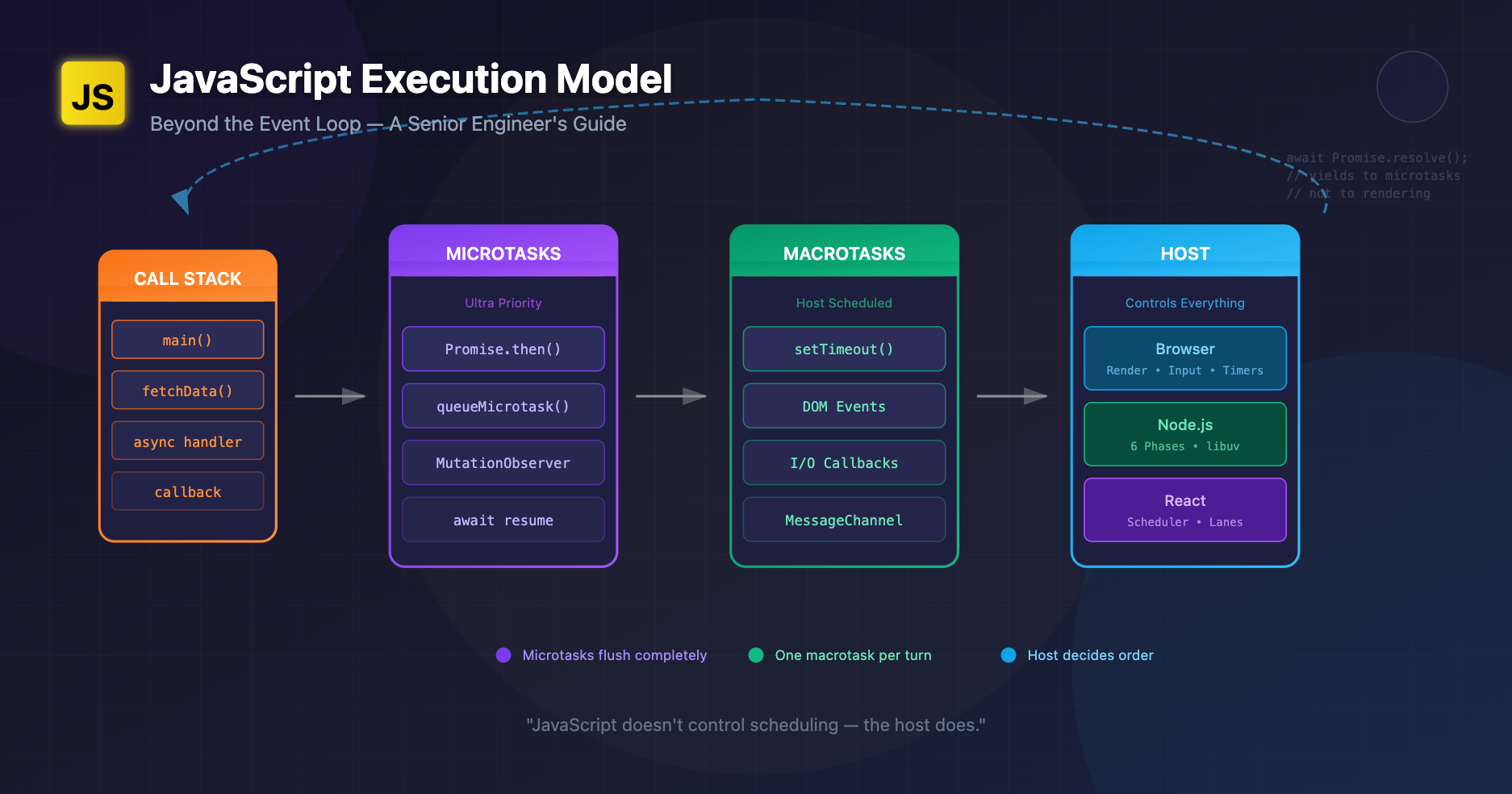
Most explanations of the JavaScript runtime stop at the call stack, event loop, and a queue. That's enough for beginners, but senior engineers know there's more happening under the hood: scheduling layers, host-driven queues, microtask semantics, async stack reconstruction, and cross-runtime behavioural differences that decide whether your production code works smoothly… or unpredictably.
This post explains the execution model as it actually works today across browsers, Node, and frameworks like React. If you already know the basics, this is the layer beneath.
A Better Mental Model: "Execution Pipelines", Not "The Event Loop"
The event loop diagram you've seen (stack → queues → loop) hides one critical truth:
JavaScript doesn't control scheduling — the host does.
Browsers, Node, React, and libraries each add their own pipelines, with their own queues and semantics. JavaScript is only the language sitting inside those systems.
A more accurate analogy:
Think of JS as a chef that cooks one dish at a time. The kitchen (browser/Node/React) decides the order in which dishes arrive. Microtasks are "urgent notes" slipped into the chef's hand between dishes.
What Actually Happens During Execution
1. Call Stack Execution
Normal synchronous execution. Nothing new here.
2. Microtask Queue Flush (Per Turn)
After sync code completes, the runtime drains the microtask queue to completion before moving on.
Microtasks include:
- Promise .then callbacks
- queueMicrotask
- MutationObserver callbacks
- (In Node) process.nextTick
3. Macrotask Queue Execution
Once microtasks are flushed, the host picks a new macrotask:
- setTimeout
- setInterval
- DOM events
- I/O callbacks
- MessageChannel
- Node's setImmediate
- fetch → .then (Promise) is microtask, but network completion enqueues a macrotask
4. Rendering Pipeline (Browsers Only)
Browsers may render between macrotasks, but microtasks can postpone rendering.
This 4-stage cycle is far more nuanced than the simple "event loop" most people reference.
Microtasks vs Macrotasks: Real-World Use Cases
Microtasks (ultra-priority)
Use when you must:
- Run logic immediately after current JS finishes
- Batch mutations before layout
- Guarantee sequencing regardless of timers or rendering
doWork();
queueMicrotask(() => {
  // Runs *before* the browser has a chance to paint
  updateDOMState();
});
Macrotasks (yielding to the host)
Use when:
- You want to let rendering happen first
- You want to allow other events (like input) to process
- You need predictable scheduling across environments
setTimeout(() => {
  // Browser may render before this
  hydrateUI();
});
Subtle difference that bites senior devs:
setTimeout(() => console.log("macro"));
Promise.resolve().then(() => console.log("micro"));
// Output: micro, macro
But in Node: process.nextTick runs before microtasks, giving a third priority level.
This is why porting browser code to Node (or vice-versa) can break sequencing.
Scheduler Behaviour: How Hosts Actually Decide Order
1. Browsers
Use a multi-queue model:
- timers
- input
- networking
- resize/scroll
- idle tasks (requestIdleCallback)
- rendering
The browser picks the next macrotask from various queues. Timers may be delayed by clamped timeouts, background throttling, or rendering constraints.
2. Node.js
Node's event loop (libuv) has six phases, each with its own queue:
- timers
- pending callbacks
- idle/prepare
- poll
- check (setImmediate)
- close callbacks
And Node has a microtask checkpoint between every phase, not just at end of a turn.
So this:
setTimeout(console.log, 0, "timeout");
setImmediate(() => console.log("immediate"));
can yield different orders depending on I/O timing.
3. React (Concurrent Rendering)
React isn't "inside" the JS event loop. It builds its own scheduler (inspired by cooperative multitasking):
- Breaks work into units
- Pauses between units to let the browser handle urgent events
- Uses MessageChannel to schedule ticks
- Uses microtasks sometimes, macrotasks other times, to maintain order guarantees
React's scheduler can preempt rendering within a single JavaScript macrotask, something plain JS cannot do.
Edge Cases with Async Stack Traces
JavaScript engines reconstruct async stack traces by:
- Capturing the sync stack at await or Promise resolution
- Storing continuation frames elsewhere
- Reassembling stack when errors occur
But this reconstruction isn't perfect:
- Some stacks don't propagate across host boundaries (e.g., DOM events)
- Some frameworks add their own layers (React Fiber)
- Node's async stack traces can hide libuv transitions
async function a() {
  await b();
}
async function b() {
  await c();
}
async function c() {
  throw new Error("Oops");
}
Useful analogy: Async stack traces are like crime scene reconstructions. They show the story, not the exact reality.
Promise Internals: How They Really Work
Promises aren't just "microtasks with sugar". Internally:
- Promise creation allocates a reaction record
- Resolution enqueues a job (microtask)
- Jobs are called with their associated capability
- Errors are tracked separately via "unhandled rejection" observers in host queues
Promises create guaranteed sequencing:
- .then callbacks are always async
- .then callbacks run before any macrotask
- Errors inside .then propagate through chained reactions
This is why:
await 0;
console.log("after await");
behaves like a microtask break, not a timer.
Why "Event Loop" Explanations Are Oversimplified
The classic explanation misses:
- That hosts maintain multiple queues, not one
- That JS engines create microtasks per turn, not per loop cycle
- That Node has phases, not a single queue
- That browsers may skip rendering due to microtasks
- That React is a host scheduler, not just "JS running inside the browser"
- That async stack traces are virtualized
If you've ever thought "why does this behave differently in Chrome vs Node vs React?", this is why.
Practical Consequences in Real Apps
1. Microtask storms can block rendering
while (true) {
  await Promise.resolve(); // Never yields to render
}
This pattern will freeze the UI with 0 CPU availability for input.
2. Excessive microtasks starve timers
A burst of Promises can delay a setTimeout by hundreds of milliseconds.
3. React's scheduler may reorder work vs your assumptions
State updates inside React events sometimes flush synchronously, sometimes not, depending on the priority lane.
4. Node sequencing bugs in scripts
nextTick is notorious for causing starvation:
process.nextTick(() => {
  process.nextTick(() => {
    process.nextTick(() => console.log("still going"));
  });
});
This runs before all microtasks and can easily block I/O.
5. Async stack traces hide performance cliffs
Large promise chains result in artificial stack traces that don't show allocation hotspots.
Analogies That Stick
Microtasks: "Small urgent notes delivered to the chef before he starts the next dish."
Macrotasks: "A new order ticket placed on the counter. The chef looks at it only after finishing all notes."
React Scheduler: "A head chef deciding which dishes should be fast-tracked or paused mid-prep so customers don't wait too long."
Async Stacks: "Security camera footage reconstructed into a timeline — accurate enough, but heavily edited."
Wrapping Up
JavaScript execution isn't about "the event loop". It's about how multiple schedulers cooperate:
- The JS engine
- The browser or Node host
- The microtask mechanism
- Framework schedulers (React, Vue's nextTick, Svelte's job queues)
Mastering real-world asynchronous behaviour means reasoning about how these layers interact, not just memorizing queue priorities.