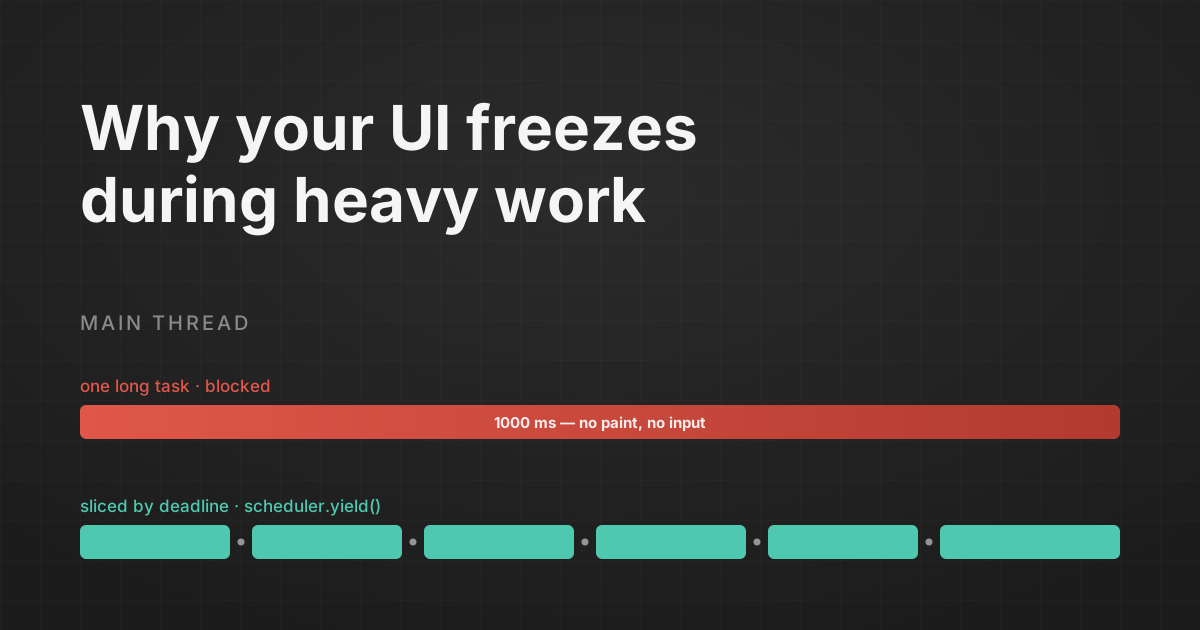
You click "Process all" on a table of ten thousand rows. The button locks into its pressed state. The spinner you carefully wired up never spins. For a full second the page is a photograph, then everything unfreezes at once and the results appear.
Nothing crashed. Your code is correct. And yet the app felt broken, because for that second the browser could not respond to a single thing the user did.
By the end of this post you'll know exactly why that happens, why useMemo and startTransition can't save you, and how to slice that work so the browser stays responsive while it runs. The fix is not a Web Worker. You teach your own loops to hand the main thread back.
The thing that's actually frozen is the main thread
The browser runs your JavaScript, layout, paint, and input handling on one thread. When a piece of JavaScript starts, it runs to completion before anything else gets a turn. No paint, no click handling, nothing.
The web platform has a name for the offenders: a long task is any task that occupies the main thread for more than 50 ms. The portion beyond that 50 ms is the "blocking" time, the window during which a click, a keypress, or a hover has to sit and wait.
This is what Interaction to Next Paint (INP) measures. INP replaced First Input Delay as a Core Web Vital on March 12, 2024, and unlike FID it watches every interaction across the whole visit and the full lifecycle: input delay, processing time, and presentation delay. The thresholds are unforgiving. Good is 200 ms or under, "needs improvement" runs to 500 ms, and anything over 500 ms is poor. Your one-second freeze isn't just poor. It's more than double the poor line, and Google has been treating it as a ranking signal for over two years now.
So the row-processing loop is a long task, and the long task is your INP problem. Same bug, two names.
Why React's concurrency features do nothing here
This is where a lot of senior engineers get comfortable and shouldn't.
React 18 and 19 ship time-slicing. startTransition, useDeferredValue, Suspense: React can pause partway through rendering a big tree, let the browser breathe, and pick up where it left off. It feels like the framework has solved responsiveness for you.
It hasn't. React's scheduler only yields during React's own rendering. The synchronous JavaScript inside your event handler, your useEffect body, or a plain for loop is opaque to it. When you do this:
const handleClick = () => {
  setStatus("working");
  const processed = rows.map((row) => ({
    ...row,
    total: computeDerivedFields(row), // heavy: parsing, formatting, math
  }));
  saveProcessed(processed);
  setStatus("done");
};
...wrapping the setStatus in startTransition changes nothing about the freeze. The rows.map over ten thousand entries is one uninterrupted synchronous task. Control never returns to React until the map is done, so the browser can't repaint the button until then, which is why the working state and your spinner appear only after the work finishes.
The map is a long task no matter what framework wraps it. The fix has to happen inside the loop.
The old fix, and why it quietly betrays you under load
The classic move is to break the loop into chunks and yield with setTimeout:
function yieldToMain() {
  return new Promise((resolve) => setTimeout(resolve, 0));
}

async function processRows(rows) {
  const processed = [];
  for (const row of rows) {
    processed.push({ ...row, total: computeDerivedFields(row) });
    await yieldToMain(); // give the browser a turn
  }
  return processed;
}
This works: the browser can now paint and handle input between iterations. The button unlocks, the spinner spins.
But it has two problems that get worse exactly when the app is busy, which is exactly when you need it to hold up.
First, setTimeout(0) is not really zero. Nested setTimeout calls get clamped to a 5 ms minimum delay by the browser. Yield after every one of ten thousand rows and you've added fifty seconds of pure timer overhead to a job that took one second.
Second, and this is the subtle one: a setTimeout continuation goes to the back of the task queue. If, while your loop is yielding, some other task gets scheduled, an analytics postMessage, a queued render, a third-party script, then that task runs before your continuation. Your own work gets starved behind everything else that showed up. DebugBear measured a version of this where the browser needed roughly three seconds to get through work that should have taken about one, because the continuations kept losing their place in line.
You yielded to be polite, and the browser took you literally.
scheduler.yield() gets its place in line back
scheduler.yield() is the platform's answer, and the one thing it does differently is the whole point.
async function processRows(rows) {
  const processed = [];
  for (const row of rows) {
    processed.push({ ...row, total: computeDerivedFields(row) });
    await scheduler.yield();
  }
  return processed;
}
await scheduler.yield() pauses the function right there, hands the main thread back so the browser can paint and respond, and returns a Promise that resolves when your work should continue. So far that sounds like the setTimeout version.
The difference is where the continuation lands. scheduler.yield() puts your continuation at the front of the queue, priority-boosted. In the Chrome team's words, the continued execution after yielding gets a priority higher than starting other tasks. The default continuation priority is "user-visible". Concretely, using MDN's mental model: a yield() continuation runs after any "user-blocking" tasks but ahead of ordinary "user-visible" tasks scheduled with postTask. The setTimeout continuation went to the back of the line. The scheduler.yield() continuation cuts back to near the front.
That single change is what makes it safe to yield under load. Your loop stays interruptible for input, but it doesn't get starved by every task that wanders in while it's paused. In the DebugBear comparison, splitting a one-second blocking task into two 500 ms chunks with await scheduler.yield() let other tasks run after about one second instead of three, and shrank the frozen button's :active state from roughly a second to about 500 ms.
The Promise resolves with undefined on success. It can also reject with AbortSignal.reason if you've tied the yield to an abort signal, which is a clean way to bail out of a long job when the user navigates away.
Yield by deadline, not by iteration
Do not yield after every item. That was the mistake that turned setTimeout into fifty seconds of clamp overhead, and even without the clamp, handing control back ten thousand times is pointless churn.
Yield by deadline instead. Do a burst of work until you've spent around 50 ms, then yield once, then start a new burst. You stay under the long-task threshold without paying for a context switch on every row. Track elapsed time with performance.now():
async function runJobs(jobQueue, deadline = 50) {
  let lastYield = performance.now();

  for (const job of jobQueue) {
    job();

    if (performance.now() - lastYield > deadline) {
      await yieldToMain();
      lastYield = performance.now();
    }
  }
}
Notice this calls yieldToMain, not scheduler.yield directly. That matters, because scheduler.yield() is not something you can assume exists.
The feature detect you actually have to ship
Support is real but incomplete. scheduler.yield() landed in Chrome 129 (September 2024), Edge 129, and Firefox 142, which shipped the Prioritized Task Scheduling API on August 19, 2025, exactly a year ago today, completing cross-engine support. Safari still has not shipped it, so it is not Baseline. As of August 2026 it reaches about 71.5% of global browsers, and the missing slice is essentially all Safari.
That means unguarded scheduler.yield() throws for a large chunk of your users. Feature-detect and fall back:
function yieldToMain() {
  if (globalThis.scheduler?.yield) {
    return scheduler.yield();
  }
  // Safari and older browsers: yield without the priority boost.
  return new Promise((resolve) => setTimeout(resolve, 0));
}
On Chrome, Edge, and Firefox your users get the front-of-queue continuation. On Safari they get plain setTimeout yielding, which is still far better than a frozen thread, just without the priority boost. If you'd rather have consistent behavior everywhere, the scheduler-polyfill package fills the gap. Either way, the batcher above stays exactly the same, because it only ever talks to yieldToMain.
One API to avoid: isInputPending(). It looks tempting for "only yield if the user is actually interacting," but web.dev now recommends against it, calling it unreliable and too narrow. Reach for deadline-based yielding, not input polling.
When yielding is the wrong tool, and a Worker is right
Yielding keeps the work on the main thread and slices it. That's a strength when the work has to touch the DOM, read layout, or update React state as it goes, because Workers can't do any of that. It's also fine for bursty, medium-length work that finishes in a handful of chunks.
But slicing does not make the work cheaper. It spreads the same total CPU cost across more frames. If you're parsing and aggregating a fifty-megabyte JSON payload, chunked yielding keeps the page technically responsive while it grinds for several seconds, and that is its own kind of bad experience.
Pure CPU work that never touches the DOM belongs on another thread. Move it to a Web Worker, where it can run flat-out without ever blocking input, and post the result back when it's done. I wrote a full walkthrough of that approach in Web Workers: The Secret to Smooth JavaScript Performance, and the two techniques are complements, not rivals.
The dividing line I use: if the loop reads or writes the DOM, or needs to reflect progress in the UI as it runs, keep it on the main thread and yield. If it's a self-contained "take this data, give me back that data" computation, send it to a Worker. When you're unsure, ask whether the work needs the DOM.
The takeaway
Your framework's scheduler stops at the edge of its own render. Everything your loops do beyond that edge is a long task the browser must finish before it can answer a click, and that wait is precisely what INP scores against you.
So stop waiting for useMemo to rescue an event handler it was never going to touch. Find the loop that runs longer than 50 ms, teach it to yield by deadline, and give it scheduler.yield() so its continuation keeps its place in line. When the work outgrows slicing, hand it to a Worker. Either way, the browser gets its turns back, and your users get an app that answers when they tap it.